When you, my beloved three (maybe four) readers, leave a comment here, I get an email. If you've asked a question, or in some other way compelled me to hit the Reply button, I'm always disappointed when your email address comes up as "no-reply blogger", so I cannot send you an email without jumping through hoops to look you up, if I can even find you at all.
I've never quite understood the magic of changing this setting, even for myself - until now! My pal Marianne over at RuffHaven linked to this wonderful post over at artsee bloggers (which is a cool blog, by the way) with detailed instructions of how to change your Blogger settings to correct this situation. And it even has PICTURES! With lines and arrows! :)
So if you'd like to come out of the shadows and let bloggers reply via email to the comments you post, go here and follow the easy steps.
I hope to get back to some non-geeky stuff tonight. Thanks for stopping by!

Showing posts with label Technobabble. Show all posts
Showing posts with label Technobabble. Show all posts
Friday, August 5, 2011


Friday, July 3, 2009
A Funny Thing Happened At The Office ...
I am in a funk. I think it is because I have TOO MUCH STUFF. This morning I am sad to report I have nothing (NOTHING) newly-stamped to share with you. :-(
HOWEVER, I do have something to share that I learned yesterday at work. Maybe because it was Virtual Friday (we have the 3rd off), or maybe I need a vacation, or maybe we were all working SO HARD we needed an outlet. Yeah, that's it - we were working SO HARD!
What did I learn? I found a secret Microsoft code for flipping your entire desktop on its ear! Wha? Gimme a sec to explain.
I used to be in Systems Security, and I always always always lock my desktop when I leave my desk, even if it is just to go to the printer. By 'lock' I mean Ctrl+Alt+Delete + Lock, and you have to enter your userid and pw to unlock it. It's what keeps people from sending emails from you to the CEO when you are not looking.
So I had to go to a meeting, and I did my usual Ctrl+Alt+Del + Lock and ... ... my entire desktop TURNED SIDEWAYS! OMG!
 It went from this ...
 ... to this.
It totally freaked me out! I said something incredibly intelligent like "GAH!", then I locked my desktop and went to my meeting. Afterwards, I went to a fellow worker and asked if she knew how I could get my desktop right-side up again, and she started to laugh uncontrollably. She even came by to look, and she had no clue how to fix it, but thought it was hysterical anyway. And no, I had no plans to tilt my head for the rest of the day!
It was endless entertainment for a while until a very quiet cube neighbor told me to hit Ctrl+Alt and the Up arrow. It WORKED! While the rest of us were laughing at my dumb luck, he'd been searching forums for my little problem. As it turns out, I'd hit Ctrl+Alt and the Right arrow instead of Ctrl+Alt+Delete.
So let this be a lesson to you. Strange things happen when your time sheet looks like this:
 (available vacation hours)
 (available sick time)
I'm just sayin' ......
HOWEVER, I do have something to share that I learned yesterday at work. Maybe because it was Virtual Friday (we have the 3rd off), or maybe I need a vacation, or maybe we were all working SO HARD we needed an outlet. Yeah, that's it - we were working SO HARD!
What did I learn? I found a secret Microsoft code for flipping your entire desktop on its ear! Wha? Gimme a sec to explain.
I used to be in Systems Security, and I always always always lock my desktop when I leave my desk, even if it is just to go to the printer. By 'lock' I mean Ctrl+Alt+Delete + Lock, and you have to enter your userid and pw to unlock it. It's what keeps people from sending emails from you to the CEO when you are not looking.
So I had to go to a meeting, and I did my usual Ctrl+Alt+Del + Lock and ... ... my entire desktop TURNED SIDEWAYS! OMG!
 It went from this ...
 ... to this.
It totally freaked me out! I said something incredibly intelligent like "GAH!", then I locked my desktop and went to my meeting. Afterwards, I went to a fellow worker and asked if she knew how I could get my desktop right-side up again, and she started to laugh uncontrollably. She even came by to look, and she had no clue how to fix it, but thought it was hysterical anyway. And no, I had no plans to tilt my head for the rest of the day!
It was endless entertainment for a while until a very quiet cube neighbor told me to hit Ctrl+Alt and the Up arrow. It WORKED! While the rest of us were laughing at my dumb luck, he'd been searching forums for my little problem. As it turns out, I'd hit Ctrl+Alt and the Right arrow instead of Ctrl+Alt+Delete.
So let this be a lesson to you. Strange things happen when your time sheet looks like this:
 (available vacation hours)
 (available sick time)
I'm just sayin' ......
Wednesday, April 22, 2009
I'm Baaaaaaack
Thanks to the super-duper Help forum at Blogger, I found the answer to my problems with IE. I had a mis-placed font tag and IE was throwing a fit over it, but it has now been corrected. Thank you all for your emailed comments about not being able to read my blog. I think I might actually have more than 3 (maybe 4) beloved readers (lurkers). ;-)
Monday, April 20, 2009
Blogger Behaving Badly with IE
Phooey! My Blog cannot be opened in Internet Explorer! Rats! And I just opened it a little bit ago. Oh, well. It opened just fine in Firefox. If you use Google or some other Reader, or if you get an email feed, you should be okay to read my posts, but this will wreak havoc on my comments, which will kill me, fer sure.
The error you will get if you try is that IE cannot open the site, operation aborted. Yeah, real helpful. Some nonsense about DNS. Phooey, I say, phooey on you-y! Just switch to Firefox. That'll show those Microsloth people a thing or two, huh?
The error you will get if you try is that IE cannot open the site, operation aborted. Yeah, real helpful. Some nonsense about DNS. Phooey, I say, phooey on you-y! Just switch to Firefox. That'll show those Microsloth people a thing or two, huh?
Friday, April 10, 2009
How To Move Your Widgets (an HTML hack)
I am so late to this Blogger gig that I find it amazing I could figure out something and then have veteran bloggers ask me how I did it. But being a former member of Future Teachers of America (I kid you not, but it was back in 7th Grade, I think), I must share something if I took the time to figure it out. (Also, by writing it down and sharing, I not only help someone else, I remember what I did for myself, since I'd forget otherwise.)
So today I wrote a beautifully-formatted Word document, with instructions and links and pictures and lots of arrows (no 24 8 x 10 color glossy photos, though ... name that song!) ... and I just learned Blogger will not allow the upload of a Word document. They say it is for security reasons, so, oh well, okay, but geez, it is so pretty! So here is my attempt to post the How To by cutting and pasting whatever Blogger will let me cut and paste. If you have problems reading the blurry images with teeny tiny print that I have included here, let me know and I'll email you my Word document.
Let us commence.
First: follow the instructions in this most-excellent tutorial to get your blog into the coveted three columns: http://www.bloggerbuster.com/2007/07/create-three-column-blogger-template.html. (Thanks to June for the link!)
Once you finish with the instructions in the above link, you will have a three-column format with all your widgets still in their original right-hand column. I tried to drag-and-drop from the right column to the new left column, but Blogger was having none of that. So I resorted to hacking the HTML. Hey, it's what I do.
Make sure you do a back-up of your template before you start any hack, so you can go back. Check the default file name, too, cuz Blogger defaulted mine to the same as the original, so I saved the new one as that name with an added “-3col” to keep them different.
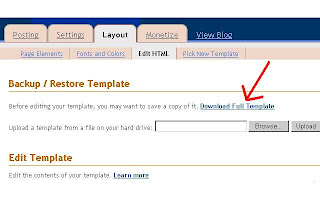
1. Back-up your current template. DO THIS:
2. Making the left-sidebar-wrapper ‘container’.
This is a crucial step! This is (I am convinced) the reason my initial drag-and-drop attempt failed.
In your HTML, look for this:

(That teeny print says left-sidebar-wrapper.)
This is the stuff that you just added for your left column in the above instruction link. My left-sidebar-wrapper got the default '/' at the end of the b:section tag, and we’ll need to change this to accommodate content.
Take out that trailing ‘/’ after the ‘yes’ and add the following b:section close tag:

Okay, now you have a container to hold your widgets. Let's start moving them!
3a. Moving your widgets via drag-and-drop.
You remember how up above I said Blogger would not let me drag-and-drop my widgets from one sidebar to the other? Well that's because of that pesky '/' that we just removed. Once that is done, you now have a container, and you can drag-and-drop your widgets (in the Layout view) from the right sidebar to the left. This is MUCH SAFER than an HTML hack, but if you loooove HTML, or maybe you just want a little adventure in your life, then read the next section. If you choose to drag-and-drop (the better choice, I think), make sure to go to the last section about previewing and backing up your template with your changes.
3b. Moving your widgets via an HTML hack.
Look for the div id="sidebar-wrapper" section (mine looks like this post-widget-move, but all your widgets should be here initially):
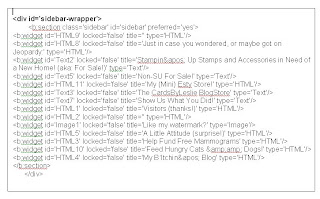
Each of those b:widget lines represents one of your widgets.
Carefully highlight one or more of your sidebar-wrapper widgets, then cut from the current sidebar-wrapper and paste it between the b:section tags in your left-sidebar-wrapper:
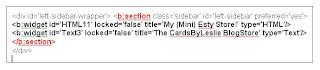
You have now successfully moved the widgets!
4. Checking your work, and the back-up.
Go ahead and preview your blog to see how it looks, or look at the layout tab and you should see your widgets on the left. I am not kidding, it is really this easy.
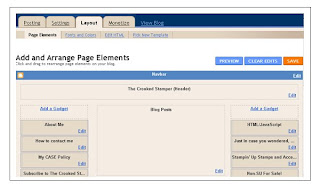
Check out that new left-hand column! Schnazzy, huh?
When you are done re-arranging your widgets, make sure to save your template as a different name…back-up is a good thing.
When I had my background skin issue, having these backups let me just import the old template and go back to the way it was. Then, when I found the three-column skin, I simply imported my three-column template, and I was done. (Of course, I am also wishy-washy, so the ability to go back and forth like this helps me a lot.)
That's it - you are done!
So you see - there is no need to be afraid of a three-column Blogger template because you don't want to re-do all your widgets, because you get to keep them! Now go forth and move some widgets!!!
So today I wrote a beautifully-formatted Word document, with instructions and links and pictures and lots of arrows (no 24 8 x 10 color glossy photos, though ... name that song!) ... and I just learned Blogger will not allow the upload of a Word document. They say it is for security reasons, so, oh well, okay, but geez, it is so pretty! So here is my attempt to post the How To by cutting and pasting whatever Blogger will let me cut and paste. If you have problems reading the blurry images with teeny tiny print that I have included here, let me know and I'll email you my Word document.
Let us commence.
First: follow the instructions in this most-excellent tutorial to get your blog into the coveted three columns: http://www.bloggerbuster.com/2007/07/create-three-column-blogger-template.html. (Thanks to June for the link!)
Once you finish with the instructions in the above link, you will have a three-column format with all your widgets still in their original right-hand column. I tried to drag-and-drop from the right column to the new left column, but Blogger was having none of that. So I resorted to hacking the HTML. Hey, it's what I do.
Make sure you do a back-up of your template before you start any hack, so you can go back. Check the default file name, too, cuz Blogger defaulted mine to the same as the original, so I saved the new one as that name with an added “-3col” to keep them different.
1. Back-up your current template. DO THIS:

2. Making the left-sidebar-wrapper ‘container’.
This is a crucial step! This is (I am convinced) the reason my initial drag-and-drop attempt failed.
In your HTML, look for this:

(That teeny print says left-sidebar-wrapper.)
This is the stuff that you just added for your left column in the above instruction link. My left-sidebar-wrapper got the default '/' at the end of the b:section tag, and we’ll need to change this to accommodate content.
Take out that trailing ‘/’ after the ‘yes’ and add the following b:section close tag:

Okay, now you have a container to hold your widgets. Let's start moving them!
3a. Moving your widgets via drag-and-drop.
You remember how up above I said Blogger would not let me drag-and-drop my widgets from one sidebar to the other? Well that's because of that pesky '/' that we just removed. Once that is done, you now have a container, and you can drag-and-drop your widgets (in the Layout view) from the right sidebar to the left. This is MUCH SAFER than an HTML hack, but if you loooove HTML, or maybe you just want a little adventure in your life, then read the next section. If you choose to drag-and-drop (the better choice, I think), make sure to go to the last section about previewing and backing up your template with your changes.
3b. Moving your widgets via an HTML hack.
Look for the div id="sidebar-wrapper" section (mine looks like this post-widget-move, but all your widgets should be here initially):

Each of those b:widget lines represents one of your widgets.
Carefully highlight one or more of your sidebar-wrapper widgets, then cut from the current sidebar-wrapper and paste it between the b:section tags in your left-sidebar-wrapper:

You have now successfully moved the widgets!
4. Checking your work, and the back-up.
Go ahead and preview your blog to see how it looks, or look at the layout tab and you should see your widgets on the left. I am not kidding, it is really this easy.

Check out that new left-hand column! Schnazzy, huh?
When you are done re-arranging your widgets, make sure to save your template as a different name…back-up is a good thing.
When I had my background skin issue, having these backups let me just import the old template and go back to the way it was. Then, when I found the three-column skin, I simply imported my three-column template, and I was done. (Of course, I am also wishy-washy, so the ability to go back and forth like this helps me a lot.)
That's it - you are done!
So you see - there is no need to be afraid of a three-column Blogger template because you don't want to re-do all your widgets, because you get to keep them! Now go forth and move some widgets!!!
Monday, February 23, 2009
Monday Evening Ramblings
I have a lot of STUFF rattling around in my brain this evening, and if I do not get it out, I'll never get to sleep tonight. Some of these topics are life lessons, some are stamping, some are ... well, just read on if you'd like to find out. 'Tis quite a variety. To save you some time, I'll number them so you know where to skip to for the next one. ;-)
1. The laptop's death and re-birth was a mixed blessing for me. First, it provided endless frustration, which I do not need in my already scatter-brained lifestyle. BUT, I found that when I felt myself longing to just sit on the couch with the laptop and surf, I couldn't, so I did something else, probably more contructive. And I lived to tell about it! I also learned that Disk 1 of 5 that I burned to back up all my files failed me. It is unreadable on any computer, so in computer-speak, it is "toast". What was on that disk (disc)? Only all my software downloads and desktop files. Sigh ... So poor moi had to re-download all the crap I used to have on the laptop, and ya know what? I do not need it all! This baby boots up way faster now than it used to. Funny how that works, isn't it? And by having to re-download stuff, I got the newer versions, and they rock! I really do need to get out more.
2. My corn bread effort from Sunday was the best of the bunch, so that's what I made this evening to bring in to work tomorrow. BUT, because I was deeply mired in sorting and bagging my just-arrived SU stamp camp orders, I lost track of time and let it sit too long in the oven (read: over-cooked it), so I fear it will be dry. Oh, well, I had no plans to win any medals, anyway. By the way, I was commissioned (well, not really commissioned, as there was no gain of any kind on my part, so let's say I was asked) to make the signage for our cook-off awards. I did, and I will try to remember to take my camera to work tomorrow so you can see one of them proudly displayed in Cubeville. Oh, and if I never, ever, ever see corn bread again, it will be too soon.
For Kristie: This is what corn bread looks like (at least what mine looks like):
 Please ignore those dark marks on the pan. I was a bad girl and I put pats of butter in the warmed stoneware pan before I added the batter. This probably permanently damaged the dish, but you know what? That corn bread was y-u-m-m-y. You cannot go wrong with butter.
Also, please ignore the fact that 1/4 of the bread has gone missing. I have no idea what happened.
3. I need a wife. (No offense to those of you who ARE wives, as I used to be one myself, and I know how much I used to do for others.) After I left the office, I stopped to pick up my last pair of reading glasses that they had to adjust for me; then I went to the grocery for a few things I needed, including the Rx that I called in last night and my Dr failed to respond to so the Pharmacy has to re-contact him tomorrow and I get to go back tomorrow and try again; I got home, re-arranged the seats in the car, and took 3 of my Dining Room chairs and stowed them in the car - I need to take them to my handyman (who is home with newborn twins) so they can be repaired so The Ladies do not fall and make a claim against my insurance for injuries sustained; I put a load of laundry in the washer; I made a batch of corn bread; I sorted and bagged my SU orders; and it was 7:45 before I sat down to breathe. I did not vaccuum yet - that will have to wait until tomorrow. And I keep forgetting to call Joann's to see if I can bring in some scissors to be sharpened. Sigh ... see? I need a wife. Or maybe a Personal Assistant! Oooh, I have actually spoken with someone who suggested I might be able to afford to retire if I sold myself as a Personal Assistant. More on that some other time, though.
 This is a 'Leslie' card. It's your basic layered image on a piece of patterned paper (from the Pet Slab I needed to own, thankyouverymuch), and a simple sentiment. Didja notice I snuck in some ribbon, too? That is a piece off one of the spools of 4,000 yards of ribbon I have in The Other Room. Only 3,999.5 to go on that one, now.
 Then there is this series. I found two packages of virgin rub-ons I'd bought a while ago because they reminded me of June, and what she'd use on a card. I made a template for the cup cake out of cardboard (hand drawn, yes ...) and traced the pieces on two different patterned papers I thought went well together. I crimped the bottom piece. Did you notice the strip of c/s under the ribbon? That is a piece of the backing from the rub-on packaging!
 I carried the theme throughout the cards, just using different sentiments from the rub-ons. This is actually the first one I made, and I totally hacked the corner, so in desperation I cut it off and replaced it with a faux folded corner made out of white, and put in a brad to make it look like I meant to do that.
 Then on the next two cards I did it on purpose. :-)

1. The laptop's death and re-birth was a mixed blessing for me. First, it provided endless frustration, which I do not need in my already scatter-brained lifestyle. BUT, I found that when I felt myself longing to just sit on the couch with the laptop and surf, I couldn't, so I did something else, probably more contructive. And I lived to tell about it! I also learned that Disk 1 of 5 that I burned to back up all my files failed me. It is unreadable on any computer, so in computer-speak, it is "toast". What was on that disk (disc)? Only all my software downloads and desktop files. Sigh ... So poor moi had to re-download all the crap I used to have on the laptop, and ya know what? I do not need it all! This baby boots up way faster now than it used to. Funny how that works, isn't it? And by having to re-download stuff, I got the newer versions, and they rock! I really do need to get out more.
2. My corn bread effort from Sunday was the best of the bunch, so that's what I made this evening to bring in to work tomorrow. BUT, because I was deeply mired in sorting and bagging my just-arrived SU stamp camp orders, I lost track of time and let it sit too long in the oven (read: over-cooked it), so I fear it will be dry. Oh, well, I had no plans to win any medals, anyway. By the way, I was commissioned (well, not really commissioned, as there was no gain of any kind on my part, so let's say I was asked) to make the signage for our cook-off awards. I did, and I will try to remember to take my camera to work tomorrow so you can see one of them proudly displayed in Cubeville. Oh, and if I never, ever, ever see corn bread again, it will be too soon.
For Kristie: This is what corn bread looks like (at least what mine looks like):
 Please ignore those dark marks on the pan. I was a bad girl and I put pats of butter in the warmed stoneware pan before I added the batter. This probably permanently damaged the dish, but you know what? That corn bread was y-u-m-m-y. You cannot go wrong with butter.
Also, please ignore the fact that 1/4 of the bread has gone missing. I have no idea what happened.
3. I need a wife. (No offense to those of you who ARE wives, as I used to be one myself, and I know how much I used to do for others.) After I left the office, I stopped to pick up my last pair of reading glasses that they had to adjust for me; then I went to the grocery for a few things I needed, including the Rx that I called in last night and my Dr failed to respond to so the Pharmacy has to re-contact him tomorrow and I get to go back tomorrow and try again; I got home, re-arranged the seats in the car, and took 3 of my Dining Room chairs and stowed them in the car - I need to take them to my handyman (who is home with newborn twins) so they can be repaired so The Ladies do not fall and make a claim against my insurance for injuries sustained; I put a load of laundry in the washer; I made a batch of corn bread; I sorted and bagged my SU orders; and it was 7:45 before I sat down to breathe. I did not vaccuum yet - that will have to wait until tomorrow. And I keep forgetting to call Joann's to see if I can bring in some scissors to be sharpened. Sigh ... see? I need a wife. Or maybe a Personal Assistant! Oooh, I have actually spoken with someone who suggested I might be able to afford to retire if I sold myself as a Personal Assistant. More on that some other time, though.
4. I think if you have a stamping style, you need to try new things to stretch your self-imposed boundaries and to grow as an artist (and we are artists, peeps!) But I also think you should not lose who you are and the style that is 'you'. For example: my stuff is pretty basic. Not too froo-froo, I mostly stamp (as opposed to paper crafting - I like the 3-D stuff, but honestly, it does not sell for me, and I have no where to store it, so it is just easier to not go there), I need to put ribbon on things ... you know: ME. I will be influenced by others, definitely, but I will usually apply their style to what I do and it will be a blend, which is a good thing! Case in point:
 This is a 'Leslie' card. It's your basic layered image on a piece of patterned paper (from the Pet Slab I needed to own, thankyouverymuch), and a simple sentiment. Didja notice I snuck in some ribbon, too? That is a piece off one of the spools of 4,000 yards of ribbon I have in The Other Room. Only 3,999.5 to go on that one, now.
 Then there is this series. I found two packages of virgin rub-ons I'd bought a while ago because they reminded me of June, and what she'd use on a card. I made a template for the cup cake out of cardboard (hand drawn, yes ...) and traced the pieces on two different patterned papers I thought went well together. I crimped the bottom piece. Did you notice the strip of c/s under the ribbon? That is a piece of the backing from the rub-on packaging!
  I carried the theme throughout the cards, just using different sentiments from the rub-ons. This is actually the first one I made, and I totally hacked the corner, so in desperation I cut it off and replaced it with a faux folded corner made out of white, and put in a brad to make it look like I meant to do that.
  Then on the next two cards I did it on purpose. :-)
I still do not have the hang of some rub-ons, as they leave a residue behind that I do not like much. I have successfully removed it with an adhesive eraser in the past, but with these it started to rub off the letters, so I stopped. Hopefully, no one will notice. Hopefully. This is why I prefer stamps. Those just come out crooked.
5. Most of you have heard of Michelle Zindorf, right? Well, one of my customers (who is bolder even than I am) emailed Michelle and asked her if she'd do a class in our area, and she said YES (with conditions, of course). The big one is she has a minimum number of people that have to agree to attend, which totally makes sense, as it would need to be worth her time to travel. It would be a 3-hour class. If anyone in the MD/VA/DC area is interested, please email me (lqhanna@gmail.com) and I'll pass your email along to my customer so she has an idea of a level of interest. My doing this in no way guarantees you a place in the class! I just want one person to be coordinating the thing, and that person will NOT be ME. More deets on this later, but feel free to express an interest now and I'll pass it along.
6. I'd best be starting to formulate some projects for my March workshops/stamp-camps. I think they are really Stamp Camps. No one is quite sure, though. I have a few ideas fighting their way to my frontal lobe, so hopefully they will hit paper some time this week. Wish me luck!
Hey, thanks for reading this far, and thanks for stopping by! I hope to have something of more substance for you soon. ;-)
Sunday, February 22, 2009
Politically Incorrect
Happy Sunday, my beloved readers! I am doing the Happy Dance here, as my laptop liiiiives! I was so frustrated yesterday, I even tried to format my hard drive, but it wouldn't let me. So I went to my last resort (as if formatting your hard drive isn't bad enough), and called one of my geekier friends and asked for assistance. Bottom line: after 4 hours, a complete format and reinstall, dinner, and verifying I could (at least technically) connect to the Internet, my laptop is aliiiiive! I spent the better part of last night re-installing software and getting things back to what I call 'normal'.
 And now for the explanation. I already had the donkey stamp (surprise!), but in one of my last trips to Angela's, I caved and got the elephant and sentiment, too (source: Custer's Last Stamp). I, myself, am not political, at least as far as the Party system goes, so this is not *my* statement ... I just thought it was funny!
I was not happy with any of my 12,000 sheets of patterned papers, so I made my own background. Oh, and look: the sentiment panel is crooked! I cannot even get things straight when I have lines to use as a guide! Sigh ....
I am working on the Scrap Heap, pulling various things off of it to use up so I do not have to put it away. So far, it seems to be working. I also have devised a plan for The Other Room to help me get more stuff out of sight. I'll tackle that project next month. So many things to do, but instead, today, I will be making corn bread, again. I am so close, I hope this is my last batch. I'll report back on my success, or not.
Thanks for stopping by!
Once again I can crop my pics, and all that other fun stuff. It really does not take much to make me happy.
Let's move on to the Politically Incorrect part of this post. Here is my offering:
 And now for the explanation. I already had the donkey stamp (surprise!), but in one of my last trips to Angela's, I caved and got the elephant and sentiment, too (source: Custer's Last Stamp). I, myself, am not political, at least as far as the Party system goes, so this is not *my* statement ... I just thought it was funny!
I was not happy with any of my 12,000 sheets of patterned papers, so I made my own background. Oh, and look: the sentiment panel is crooked! I cannot even get things straight when I have lines to use as a guide! Sigh ....
I am working on the Scrap Heap, pulling various things off of it to use up so I do not have to put it away. So far, it seems to be working. I also have devised a plan for The Other Room to help me get more stuff out of sight. I'll tackle that project next month. So many things to do, but instead, today, I will be making corn bread, again. I am so close, I hope this is my last batch. I'll report back on my success, or not.
Thanks for stopping by!
Sunday, December 28, 2008
Knowing When To Stop and Another Collage-y Attempt
First I give you: Knowing when to stop. I have set myself a personal goal to get the majority of my inventory of cards uploaded to my store before I hunker down to begin my scrapbook phase of the season. The scrapbooking has been delayed due to lack of ink cartridges for my photo printer, so I took advantage of this weekend and I have been in an upload frenzy. Until today, when I hit a wall. No, I have not run out of stuff to upload, but did you know Blogger has a safety net for us? If we try to do too many uploads in one day, it starts to prompt for that pesky secret word to be entered. And not just once...you have to enter it for each and every upload. What a pain.... So I've decided to give it a rest for today.


Before I began my upload marathon, I did make another attempt at that whole collage-y thing. This time I used yet another piece of the Provence paper (blue) for the background and to stand in as the sky. Not bad, not bad... I will endevor to continue my attempts at this paper piecing thing. Maybe I'll stamp something and put things together that way.
Or maybe I'll leave the house and go to the grocery store and buy myself some food. I am even out of soup. So sad...
Thanks for stopping by!
Saturday, August 2, 2008
Technology Headache (and a Plea for Help!)
Well, I've decided to try adding a Subscribe link to my blog. I spent some time over at Feedblitz, registering and configuring until I got the HTML code to include, then when I came to Blogger to add it to my page, I saw a one-click "add a subscribe button" option. Who knew?!?!?! But having gone to the trouble with Feedblitz, I made an executive decision to add both! Why not!? What better way to see how they work than to try them both? :-)
So you are not seeing double - this is a test. I think the default feed time with Feedblitz is in the wee hours of the morning, and I have no idea how the Blogger one works. So I'll spend a few days trying out the two options and eventually decide on one of them. Now, I know a few of you are probably chomping at the bit to subscribe (yeah, right ...), but please hold off for a few days until I get the hang of this thing!
ETA: Ooooooh, OOOOOOOHHH, I just had a wild idea!!! Since I do not have Google Reader or anything remotely similar, how in the heck do I subscribe to this thing?! So, anyone who wants to help me test this out, DO NOT WAIT - SUBSCRIBE NOW!!! To win something from my stash, just report back on how the two subscription thingies worked for you (or not), or if you have a preference, or if they both work the same, or whatever! The opportunity for free stuff will be open until I figure this out. :-) Play on!!!! {end ETA}
Oh, and if any of you more-experienced bloggers would like to send some wisdom or opinions my way, PLEASE DO! I need all the help I can get!
Thanks!
PS: A real post will follow shortly....
So you are not seeing double - this is a test. I think the default feed time with Feedblitz is in the wee hours of the morning, and I have no idea how the Blogger one works. So I'll spend a few days trying out the two options and eventually decide on one of them. Now, I know a few of you are probably chomping at the bit to subscribe (yeah, right ...), but please hold off for a few days until I get the hang of this thing!
ETA: Ooooooh, OOOOOOOHHH, I just had a wild idea!!! Since I do not have Google Reader or anything remotely similar, how in the heck do I subscribe to this thing?! So, anyone who wants to help me test this out, DO NOT WAIT - SUBSCRIBE NOW!!! To win something from my stash, just report back on how the two subscription thingies worked for you (or not), or if you have a preference, or if they both work the same, or whatever! The opportunity for free stuff will be open until I figure this out. :-) Play on!!!! {end ETA}
Oh, and if any of you more-experienced bloggers would like to send some wisdom or opinions my way, PLEASE DO! I need all the help I can get!
Thanks!
PS: A real post will follow shortly....
Saturday, May 24, 2008
Just Practicing
You are never too old to learn new tricks. Man, you should just see me at work! I have a very technical job, and my cube-neighbor and I are diggers...we try to figure out better ways and new features of some of the computer software we use for our analysis. When one of us figures out a new feature, we announce it to the world (much to the dismay of our fellow cubites), and we ask to go home since we've learned something new. Never works, though.
So this morning, as I was being lazy and not showering to get ready for the Farmers Market, I decided to check the ole email and read some blogs. One hour later (!!!) I am still here, but I HAVE LEARNED SOMETHING NEW! One of the things I have always wanted to do is strike out words in my blogger posts. But - the only menu items are for bold and italic. Bummer.
One of the blogs I was reading this morning had strike-through text, and I asked her how she did it. Being totaly into instant gratification, I was not content to wait for an answer, so I looked at her page source. What to my wondering eyes should I see but the HTML tag for strike-through! Well, duuuuh. If I could remember anything, I would have remembered this from HTML 101 many moons ago from The Day Job.
So here we go...let me try striking out this word:duuuuuuuh. Well, would you look at that! It works! New skill! Yay! Can I go home now? Er, wait a sec, I am home. In my jammies. Not showered yet. Gotta go shower and get my fanny to the Market and sell some cards!!! Enjoy this lovely day!
So this morning, as I was being lazy and not showering to get ready for the Farmers Market, I decided to check the ole email and read some blogs. One hour later (!!!) I am still here, but I HAVE LEARNED SOMETHING NEW! One of the things I have always wanted to do is strike out words in my blogger posts. But - the only menu items are for bold and italic. Bummer.
One of the blogs I was reading this morning had strike-through text, and I asked her how she did it. Being totaly into instant gratification, I was not content to wait for an answer, so I looked at her page source. What to my wondering eyes should I see but the HTML tag for strike-through! Well, duuuuh. If I could remember anything, I would have remembered this from HTML 101 many moons ago from The Day Job.
So here we go...let me try striking out this word:
Subscribe to:
Posts (Atom)